Net Nanny’s newest update is here!
With the all-new Net Nanny® Parental Control app for screen time parenting, you’ll have the visibility to track in real-time, the online and app activity of each child in your family, while also protecting your children from online dangers.
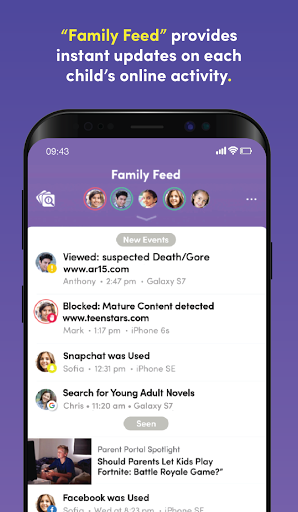
With Net Nanny’s amazing new Family Feed, you’ll see:
• Instant reporting of Internet searches
• Updates on apps used
• Instant alerts that your child may have viewed Pornography, Drugs, Weapons, Suicide or other inappropriate content
•Educational insights and descriptions from experts about installed and trending apps
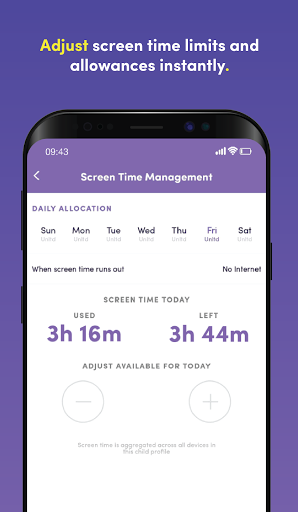
Ever wonder how much time your kids use their device? Net Nanny® lets parents see the daily total of each child’s screen time. Net Nanny® also gives parents the ability to adjust screen time limits and allowances instantly.
Do you ever argue with your child when it’s time for dinner or when they have had too much screen time?
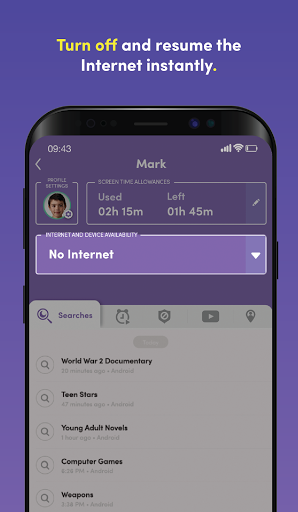
From your phone, Net Nanny® enables you to turn off the Internet instantly so you can get their attention and limit screen time.
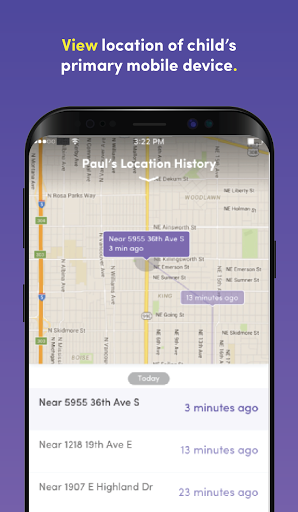
Ever worry where your child is? With Net Nanny®, you can view each child’s location with a Family Map.
Imagine the peace of mind if you had a parental control app that could...
• Give you a list of apps your child has used
• Act as an app blocker when you need it to
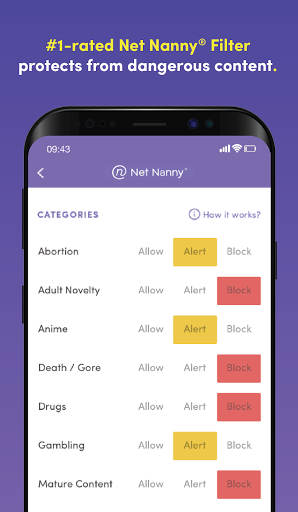
• Act as a porn blocker and block other bad content like violence with the best internet filter!
With Net Nanny®, you can be sure you have the best protection available to shield your kids from online dangers.
Not all filters are created equal. Unlike most filters that block entire sites, the award-winning Net Nanny® filtering technology looks at individual web page content and determines in real time if it is safe for your child. You’ll have complete control over the settings that will guide the monitoring, and appropriate filtering, of your kids’ devices.
Whenever Net Nanny® determines there might be an unsafe situation for your child – such as accessing dangerous app or web content – you will be notified immediately.
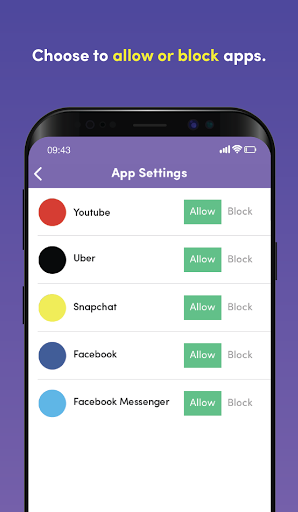
Net Nanny® allows parents to know, and then allow or block, the apps their child has downloaded on their device.
With Net Nanny® you can enhance child safety with family locator. You can see where your child has been via family search GPS tracking by mapping their location history, and if your child loses their device, you can trace its most recent locations.
Welcome to the all-new Net Nanny®, the best app for screen time parenting!
If you’re an Android user and don’t download the app from the official Google Play Store, you may find the installation process more complicated than usual.
But we are delighted to inform you that you don’t need to worry. To ensure you could install this app smoothly, we have written and uploaded a detailed tutorial. It would guide you on installing an app after downloading it from our website step by step, with the help of pictures.
You may find this helpful article on the downloading site, or visit How to install APK/XAPK files on Android.
If you need further help, please do not hesitate to contact us via email [email protected].
We fully understand your concern about safety. We agree that one person wouldn’t be too careful in the cyber world. Meanwhile, we are happy to tell you that one of our priorities is to provide our users with safe app files that they can use without any worries.
We guarantee that all the app files we provided originate from official and reliable sources. We promise that they do not contain any malware that will harm your hardware or the safety of your privacy.
We are glad to let you know that the vast majority of apps on our website are available for free download. Only a small selection of apps require payment, and their prices are set solely by the respective developers—we simply provide an official and secure download platform.
Rest assured, whether an app is free or paid, every download link on our site is verified and completely safe. You can download with confidence, and no account registration is needed—just click the download button and you're all set!
Recently we received a lot of emails from our users, which said they couldn't log in for different reasons, such as "forgot the user name or password" or "had a new phone." We are willing to help you out. Please read the notes below to see what we can do.
To answer this question, please first let us know which account you’re referring to.
If you're referring to your account of some app, like your Facebook account or your Youtube account. Unfortunately, we would not be able to help in this case. We would suggest you turn to the customer service of this application.
If you’re referring to your Appurse account, we should apologize for your confusion since there is no Appurse account. We never require registration for our service, and you will not find any procedure related to creating an account or registering on our website.
This question is essentially quite similar to the prior one. It’s a pity that we are unable to help you to cancel the subscription to a third-party application directly, while we would suggest you to contact its customer service for further information.
Sorry that we are unable to help you to get a refund from a third-party application directly. If you wish to get a refund from a third-party app, we would suggest you to contact its customer service. We would be happy to provide you the way to contact them.
If you want a refund from us, we should apologize for your confusion. Our service is 100% free, and any payment information is not required.
If you run into any site that asks you to provide your payment information, be careful. Remember never reveal your payment information to any unauthorized third parties, no matter how attempting their offer may seem.
Sorry that we cannot answer this question directly, for this only aims to answer some general questions. You may find how to use a certain app by checking our review page.